Microsoft Fabric is a SaaS data analytics platform. It’s capable of handling your entire data workflow, from collecting and processing data to building reports and dashboards. To make this happen, Fabric utilizes various ingestion and preparation options: Data Pipelines, Dataflow Gen2, Notebooks, and Eventstream.
In this article, we’ll cover how each method works, their strengths, and when it’s best to use them. Whether you’re a data engineer, analyst, or architect, understanding these pathways is the key to unlocking the full capabilities of Fabric and building scalable, modern data solutions.
What are the Data Ingestion Options in Microsoft Fabric?
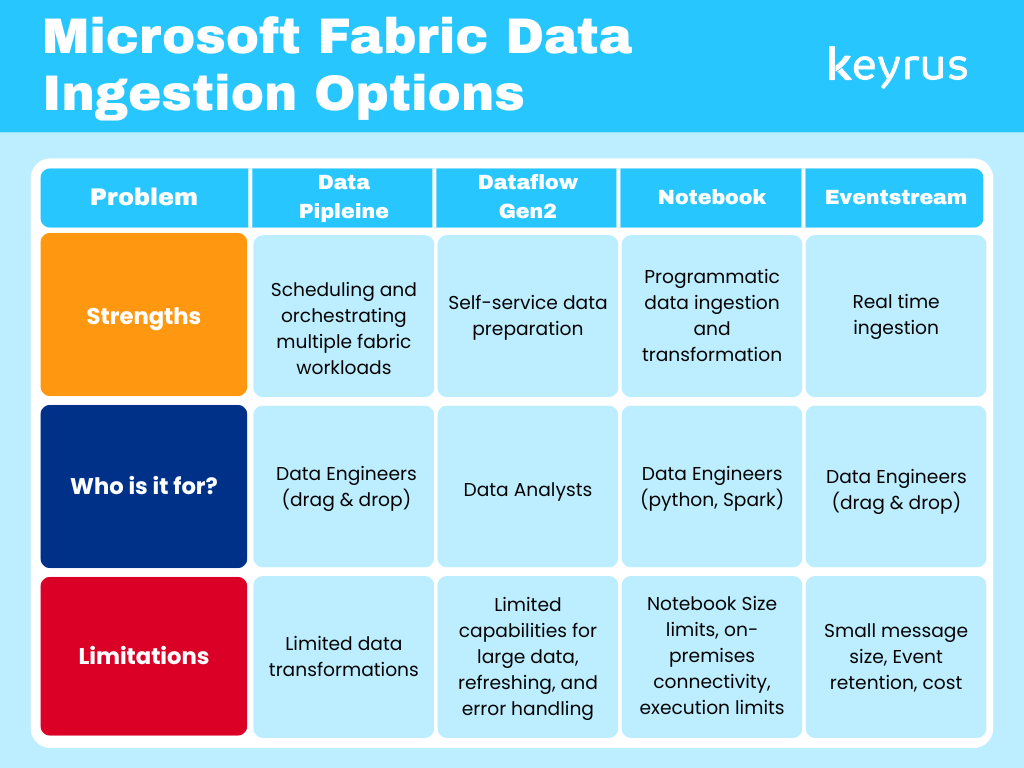
There are 4 core data ingestion options in Microsoft Fabric: Data Pipeline, Dataflow Gen2, Notebook, and Eventstream. Data pipeline orchestrates ETL/ELT workflows. Dataflow Gen 2 is a low-code/no-code ETL in Power Query. Notebook is a cook-first ingestion using Python, Spark, or SQL. Eventstream is real-time streaming ingestion. There are other options, like database mirroring, which we’ve excluded.
Data Pipeline
Data Pipeline is a tool within the Data Factory Experience in Microsoft Fabric, which is designed for analysts and engineers to build and orchestrate ETL and data ingestion workflows. It is similar to Azure Data Factory / Synapse Pipelines, though not full feature parity yet.
Key Data Pipeline Capabilities
-Activities-based Design: Build pipelines from modular “activities” that can run sequentially or conditionally
-Copy Data Activity: Main ingestion tool, move data from source to destination (manual or guided via Copy Assistant)
-No-code to Code-flexible: Some activities require coding; others support full no-code configuration
-Scheduling & Automation: Pipelines can run on set intervals and automate ingestion workflows
How It Works
Create a Pipeline → In a Fabric workspace, create a new Data Pipeline under Data Factory artifacts.
Add Activities → Each activity performs a task (e.g., Copy Data, Run Notebook, Execute Stored Procedure).
Configure & Link → Define settings, parameters, and conditional paths between activities.
Ingest Data → Use Copy Data or Copy Assistant to bring data from cloud or on-prem sources.
Orchestrate & Automate → Schedule pipeline runs, set triggers, and add alerts for governance.
Dataflow Gen2
Dataflow Gen2 is a revamped version of Power BI Dataflows (Power Query in the cloud), now part of the Data Factory Experience in Microsoft Fabric, which is designed for analysts to ingest, clean, and load data from cloud-based sources with no-code or low-code transformations and supports data output destinations, offering more flexibility than traditional Dataflows.
Key Dataflow Capabilities
-Hundreds of Connectors: Connect to files, databases, APIs, and cloud apps easily.
-Power Query Interface: Familiar transformation experience from Power BI
-Visual Query Builder: Diagram View for drag-and-drop lineage and transformation logic
-Flexible Destinations: Output to Fabric Lakehouse, Warehouse, SQL, or Kusto DB.
-Scheduling & Refresh: Set automated refresh intervals or orchestrate via Pipelines.
How It Works
Create a Dataflow Gen2 → In your Fabric workspace, choose Dataflow Gen2 under Data Factory artifacts.
Connect to Data Sources → Use any of the hundreds of connectors (Excel, CSV, databases, APIs, SharePoint, OneDrive, etc.).
Transform Data → Clean, filter, and enrich data using Power Query editor or the visual Diagram View.
Add Data Destination → Output to Fabric Lakehouse, Warehouse, SQL, or Kusto DB (Append or Overwrite).
Publish & Schedule → Save and configure auto-refresh schedules; optionally orchestrate via Data Pipelines for governance
Notebook
Notebooks in Microsoft Fabric offer a flexible code-first approach to data ingestion and transformation. It is Ideal for data engineers and advanced analysts who prefer Python, Spark, or SQL for full control. It supports both batch and interactive processing within the Fabric ecosystem & it can be fully integrated with Lakehouse, Warehouse, and OneLake for seamless data operations.
Key Notebook Capabilities
-Code-first Flexibility: Use Python, Spark, or SQL for advanced ingestion and transformation
-Integrated Environment: Fully connected to Fabric’s Lakehouse, Warehouse, and OneLake
-Batch or Interactive Runs: Execute one-time scripts or schedule recurring jobs.
-Rich Library Support: Leverage open-source Python libraries (pandas, numpy, pyspark, etc.).
-Seamless Orchestration: Combine with Pipelines for automated, governed execution.
How It Works
Create a Notebook → In your Fabric workspace, select Notebook from Data Engineering or Data Science experience.
Connect to Data Sources → Use Spark or Python connectors to access data from cloud storage, databases, or APIs.
Ingest & Load Data → Read and write data using familiar libraries (pandas, spark.read, spark.write, pyspark.sql).
Transform & Cleanse → Apply code-based logic for transformations, joins, and enrichments.
Save to Fabric Destinations → Write results to a Lakehouse, Warehouse, or Kusto DB for downstream analytics.
Schedule or Orchestrate → Automate Notebook runs using Data Pipelines for controlled ingestion workflows
Eventstreams
Eventstreams in Microsoft Fabric provide a real-time, event-driven data ingestion experience. It is Ideal for streaming scenarios such as IoT telemetry, clickstream analytics, and log ingestion.
Key Eventstreams Capabilities
-Real-time Ingestion: Ingest and process continuous data streams with low latency.
-No-code Visual Canvas: Drag-and-drop interface for source, transformation, and destination configuration
-Multiple Input/Output Options: Integrates with Event Hubs, Kafka, IoT Hub, and Fabric destinations
-Built-in Monitoring: Live metrics and dashboards for latency, volume, and errors
-Scalable & Reliable: Handles high-velocity, high-volume data streams seamlessly
How It Works
Create an Eventstream → In your Fabric workspace, select Eventstream under Real-time Analytics or Data Factory artifacts.
Add Event Sources → Connect to Azure Event Hubs, Kafka, IoT Hub, or custom APIs that publish events in real time.
Define Stream Transformations → Filter, enrich, or aggregate streaming data using a visual, no-code canvas.
Add Event Destinations → Route processed events to Lakehouse, KQL Database, Data Warehouse, or Power BI Real-Time Dashboard.
Monitor & Manage → View real-time metrics, message throughput, and schema evolution directly within Fabric
Limitations
While each of these data ingestion options has great capabilities, they also come with their own limitations. These are important to consider when choosing your data ingestion solution(s).
Data Pipeline: Limited native transformations, Activity limitations (some ADF activities are not available), External connection restrictions
Dataflow Gen2: Performance with large datasets, Refresh limitations, Limited error handling
Notebook: Size limits (32 MB limit on notebook content & 5 MB limit on rich dataframe output), On-premises connectivity, Execution limits
Eventstream: Small message size (maximum size of 1MB), Event retention (events retained after 90 days), Cost
Keyrus & Microsoft
Keyrus is proud to be a Microsoft funding, reselling, and delivery partner and to have worked on numerous Microsoft Fabric projects. We know that data is unquestionably a key to success for businesses. When used intelligently, it opens unique opportunities for facing present and future challenges. At Keyrus, we enable organizations to deploy the capabilities to make data matter: by leveraging data and AI to start making smarter, more impactful decisions.
There are 4 core data ingestion options in Microsoft Fabric: Data Pipeline, Dataflow Gen2, Notebook, and Eventstream. Data pipeline orchestrates ETL/ELT workflows. Dataflow Gen 2 is a low-code/no-code ETL in Power Query. Notebook is a cook-first ingestion using Python, Spark, or SQL. Eventstream is real-time streaming ingestion. There are other options like database mirroring which we’ve excluded.
Data Pipeline is a tool within the Data Factory Experience in Microsoft Fabric which is designed for analysts and engineers to build and orchestrate ETL and data ingestion workflows. It is similar to Azure Data Factory / Synapse Pipelines, though not full feature parity yet.
Dataflow Gen2 is a revamped version of Power BI Dataflows (Power Query in the cloud), now part of the Data Factory Experience in Microsoft Fabric which is designed for analysts to ingest, clean, and load data from cloud-based sources with no-code or low-code transformations and supports data output destinations, offering more flexibility than traditional Dataflows.
Notebooks in Microsoft Fabric offer a flexible code-first approach to data ingestion and transformation. It is Ideal for data engineers and advanced analysts who prefer Python, Spark, or SQL for full control. It supports both batch and interactive processing within the Fabric ecosystem & it can be fully integrated with Lakehouse, Warehouse, and OneLake for seamless data operations.
Eventstreams in Microsoft Fabric provide a real-time, event-driven data ingestion experience. It is Ideal for streaming scenarios such as IoT telemetry, clickstream analytics, and log ingestion.
Keyrus is proud to be a Microsoft funding, reselling, and delivery partner and to have worked on numerous Microsoft Fabric projects. We know that data is unquestionably a key to success for businesses. When used intelligently, it opens unique opportunities for facing present and future challenges. At Keyrus, we enable organizations to deploy the capabilities to make data matter: by leveraging data and AI to start making smarter, more impactful decisions.
Each method of data ingestion in Microsoft Fabric has their own strengths and limitations. Understanding what's best for you and your oganization is dependent on your inner-workings, established systems, budgets, goals, and more. However, to start understanding what may work best for you, you can use our chart comparing the 4 key methods: